
Vue.js router 활용하기
Vue.js에서 페이지를 연결하고 싶을 경우, router를 사용합니다.
이전에 작업한 store 예시 코드를 활용하여 router를 연결해보도록 하겠습니다.
그럼, 방식을 알아볼까요?
어떤 테스트 페이지를 만들까?
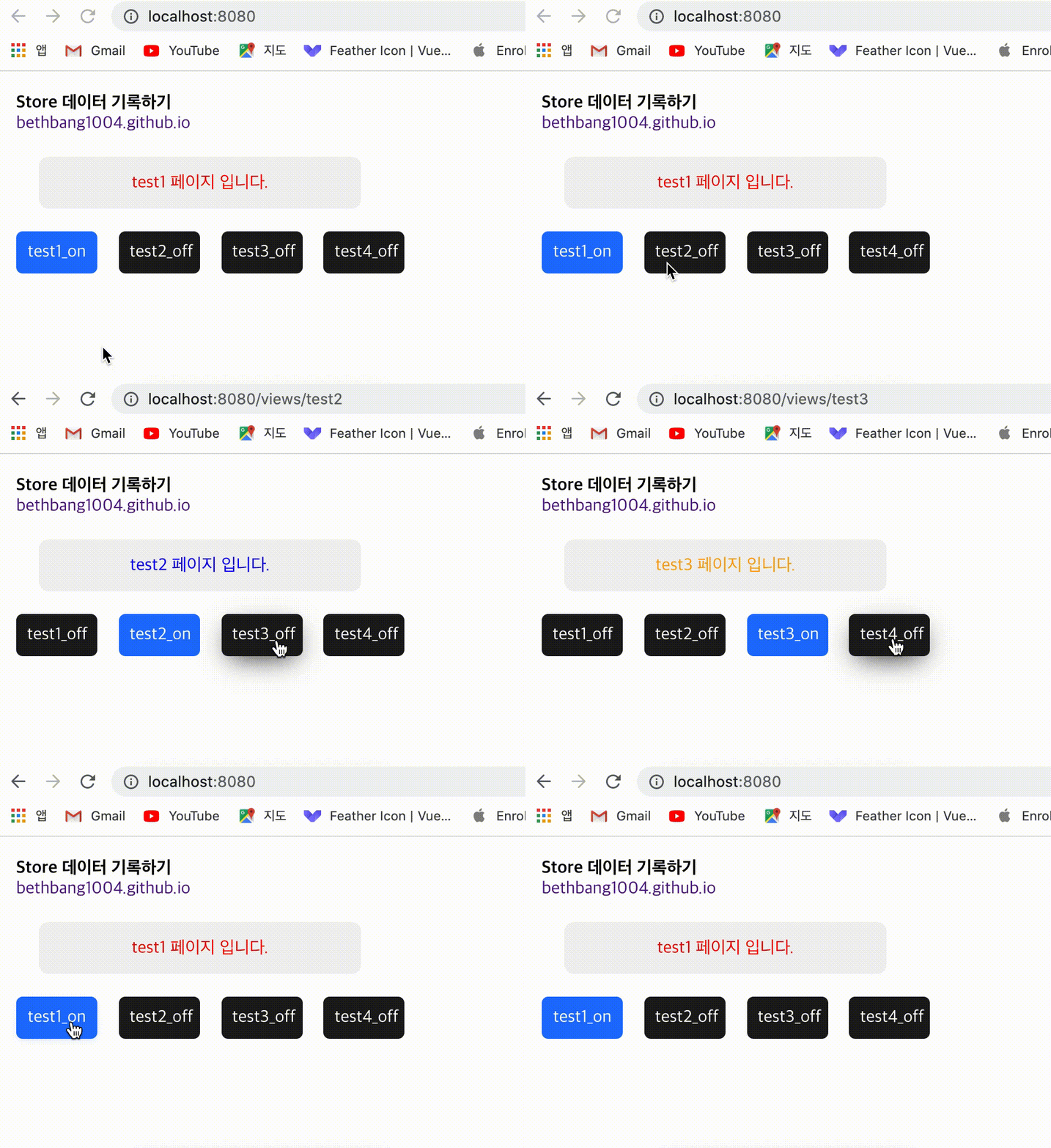
1. 모바일 환경에서 footer에서 특정 버튼 클릭 시 해당 페이지 이동 예시 화면을 만들 예정
2. 구조
- _router
- index.js
- _views
- test1.vue
- test2.vue
- test3.vue
- test4.vue
3. 참고 Github 링크
https://github.com/bethbang1004/store_footer
첫번째,
라우터 url을 만들어서 연결하는 부분입니다.
저는 최상위로 footer.vue를 컴포넌트로 정의 후, 하위로 children에 여러 파일들의 링크를 연결하는 형식으로 작성하였습니다.
컴포넌트로 정의하면 코드 활용도가 높아집니다.
Path: /src/router/index.js
{
    path: '',
    name: 'TestFooter',
    component: () => import('@/layouts/components/footer.vue'),
    children: [{
      path: '/',
      name: 'test1',
      component: () => import('@/views/test1.vue')
    }, {
      path: '/views/test2',
      name: 'test2',
      component: () => import('@/views/test2.vue')
    }, {
      path: '/views/test3',
      name: 'test3',
      component: () => import('@/views/test3.vue')
    }, {
      path: '/views/test4',
      name: 'test4',
      component: () => import('@/views/test4.vue')
    }]
  },
두번째,
라우터로 연결할 영역에 @click=”test1()” 과 같은 형태로 이벤트를 넣어줍니다.
Path: /src/layouts/components/footer.vue
<div class="locate" @click="test1()" v-if="footerBtnStatus == 0">
        <vs-button class="buttonStyle">test1_on</vs-button>
      </div>
세번째,
script의 methods 영역에 click 이벤트에서 정한 함수들을 정의하여 줍니다.
그리고 그 함수들에 router를 연결하여 줍니다.
router의 path에서 정한 경로를 methods에 this.$router.push(‘/views/test2’) 형식으로 넣어줍니다.
Path: /src/layouts/components/footer.vue
methods: {
    test1 () {
      this.$router.push('/')
    },
    test2 () {
      this.$router.push('/views/test2')
    },
    test3 () {
      this.$router.push('/views/test3')
    },
    test4 () {
      this.$router.push('/views/test4')
    }
  }
결과
store 활용 예시와 router 활용 예시 결과 화면 입니다.
Vue.js store 활용하기 포스팅 보러가기
Vue.js store 활용하기
***
이로써, router 대한 정리는 마무리 되었습니다 :)